

If you are a savvy web developer and know your way around the front-end of a website, you might want to add your own CSS or Javascript to overwrite some of the standard theme settings to achieve a more customized look and feel for your video site.
Note: This feature is only available on certain plans. Contact support@sproutvideo.com with any questions.
CSS
To add custom CSS to your video site, select the ‘Site Editor’ button at the top of the page and navigate to the ‘Code’ tab on the lefthand side of the screen. Here, you can enter CSS to your heart’s content.
Javascript
To add the custom Javascript to your video site, select the ‘Site Editor’ button at the top of the page and navigate to the ‘Code’ tab on the lefthand side of the screen. Here, you can add custom Javascript to your video site. This can be used to add arbitrary content like third-party tracking tools to your video site.
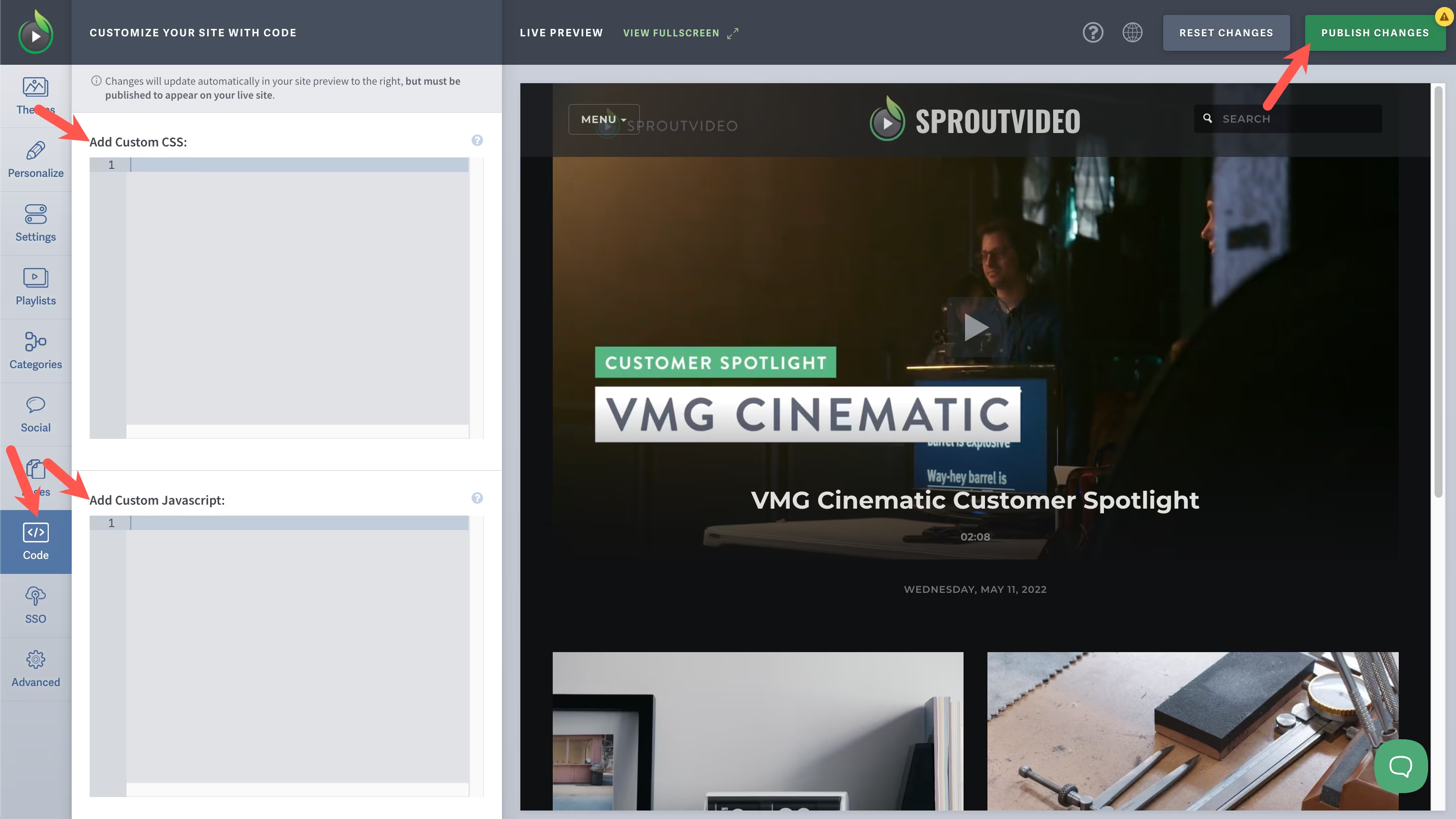
You can review your edits in the Preview of your video site. When you are finished making changes, click ‘Publish Changes’ in the upper righthand corner of the page.
Other articles in the Video Websites section:
- Overview of Advanced Video Website Settings
- Overview of Video Websites and Landing Pages
- Create Your Video Website in Two Steps
- Overview of Video Website Settings
- Overview of Video Website Privacy Settings
- How to Remove the SproutVideo Referral Logo
- How to Select or Change Themes for Your Video Website

