

If you do not want to use the Homepage, About, or Contact pages, you can disable your full video site and still keep your custom URL and branding for your individual video landing pages. You can also still leverage the other great features our video sites have to offer, like commenting, social sharing, and beautiful theme options.
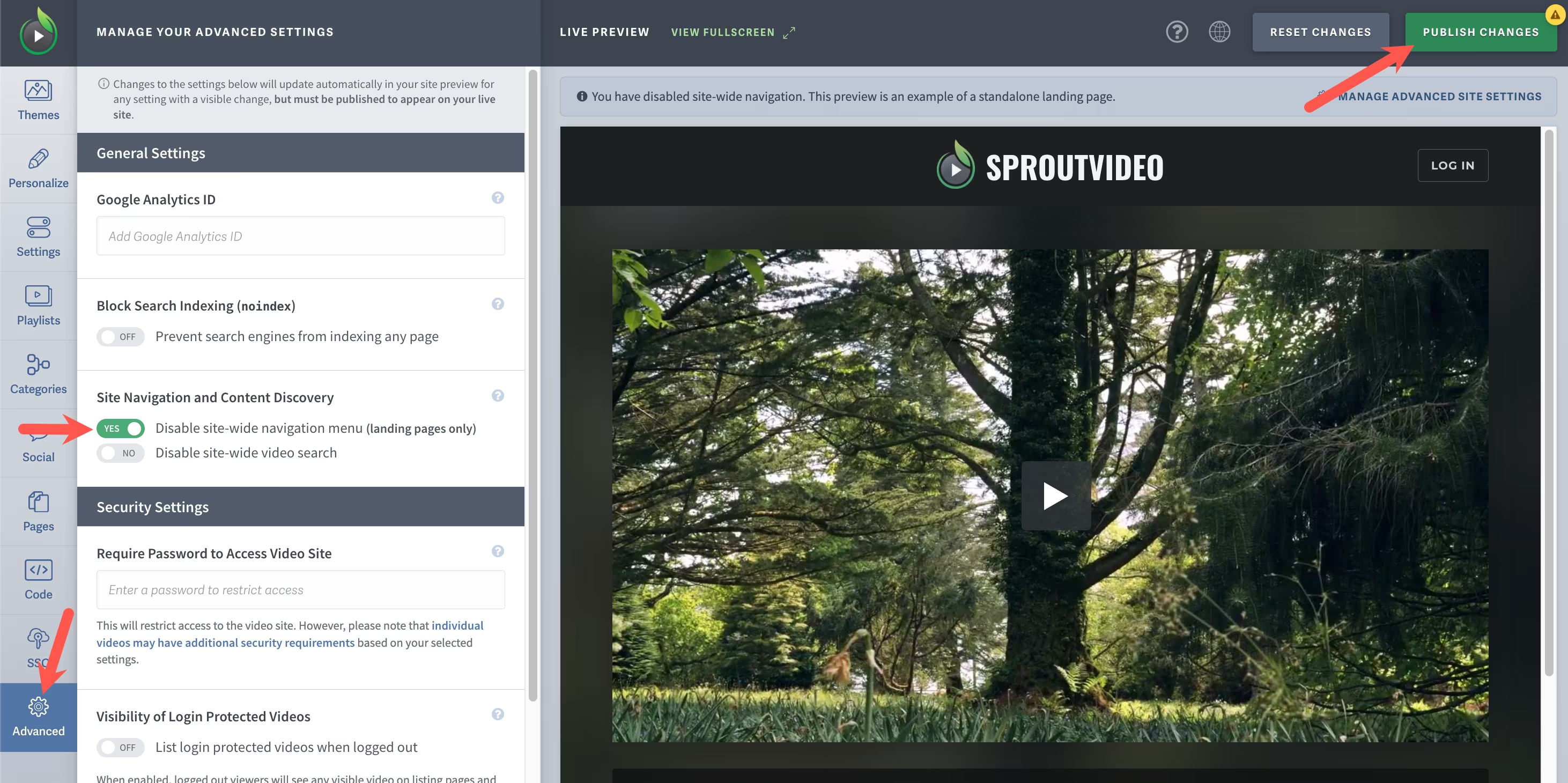
To disable your full video site, log into your SproutVideo account, select the ‘Site Editor’ button, then select the ‘Advanced’ tab on the lefthand side of your screen. Toggle the switch for ‘Disable Full Site Navigation’ and click ‘Publish Changes’ at the top right of the page.
When sharing your videos, you have to share the individual video links since your homepage link will now be disabled. Here is a help article that walks you through how to do that:
Other articles in the Video Websites section:
- Overview of Advanced Video Website Settings
- Overview of Video Websites and Landing Pages
- Create Your Video Website in Two Steps
- Overview of Video Website Settings
- Overview of Video Website Privacy Settings
- How to Remove the SproutVideo Referral Logo
- How to Select or Change Themes for Your Video Website

