


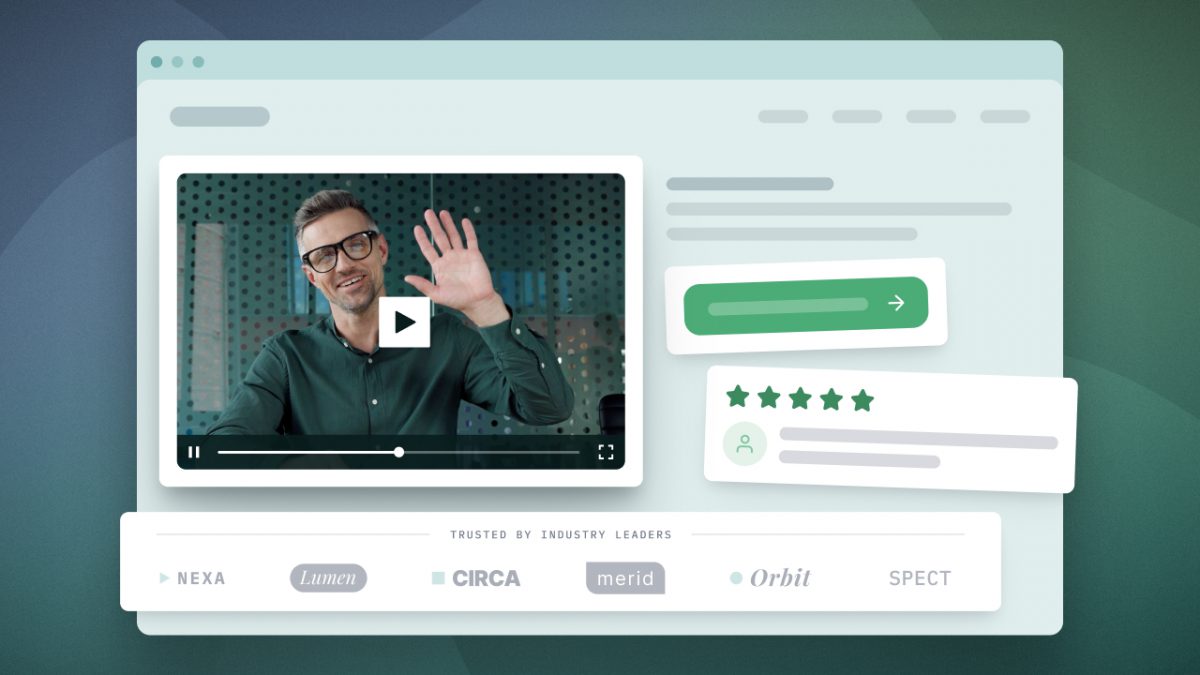

Video landing pages combine all the elements of a strong pitch and display them at the top of a webpage. Whether the video is an explainer, product demo, or testimonial, a video landing page has one job: persuade the visitor to take the next step.
Adding a video to a landing page gives visitors a low-friction way to engage, with 63% of people preferring to watch a short video when learning about a product. Moreover, 85% of people say video has convinced them to buy a product or service. This guide outlines exactly how to create a video landing page that converts:
- Where to place the video
- Which type of video to use
- How long to make the video
- Supporting elements to include
You’ll see these best practices in action with real landing page examples. Finally, learn how to add video to your own landing pages and use engagement data to increase conversions.
What Is a Video Landing Page?
A video landing page is a single-purpose web page that uses a video placed above the fold (visible without scrolling) as the primary tool to persuade visitors to take one action. Supporting elements such as text, calls to action, social proof, and other rich media guide visitors toward that action.
Why Do Videos Improve Landing Page Conversions?
Video landing pages improve conversions by providing multiple ways for visitors to engage with your messaging while focusing their attention on a single call to action.
In one widely cited case study, adding a video to TutorVista’s landing page lifted signups by more than 86%. More recently, Animoto observed a 179% average increase across ten pages where the only change was adding a video. But it’s not magic. Multiple benefits of a video landing page work together:
- Improve Product Understanding: Research on multimedia learning shows that people understand ideas more deeply when words and visuals work together.
- Shorten Sales Cycle: One short video can explain a product’s value, address objections, and show real use cases, expediting the customer journey.
- Connect with Prospects: Video builds emotional connection in a way text can’t, and pairing it with real customer proof reinforces that your solution actually works.
- Get Actionable Data: A static page can only tell you so much. Video analytics show you exactly what viewers watched, so you know how to improve engagement.
- Improve SEO Visibility: With a video sitemap, your video can appear in the SERP, video results, or image results as a thumbnail, increasing your chances of being found. Adding video schema helps search engines understand and display your content.
How to Build a Video Landing Page That Converts
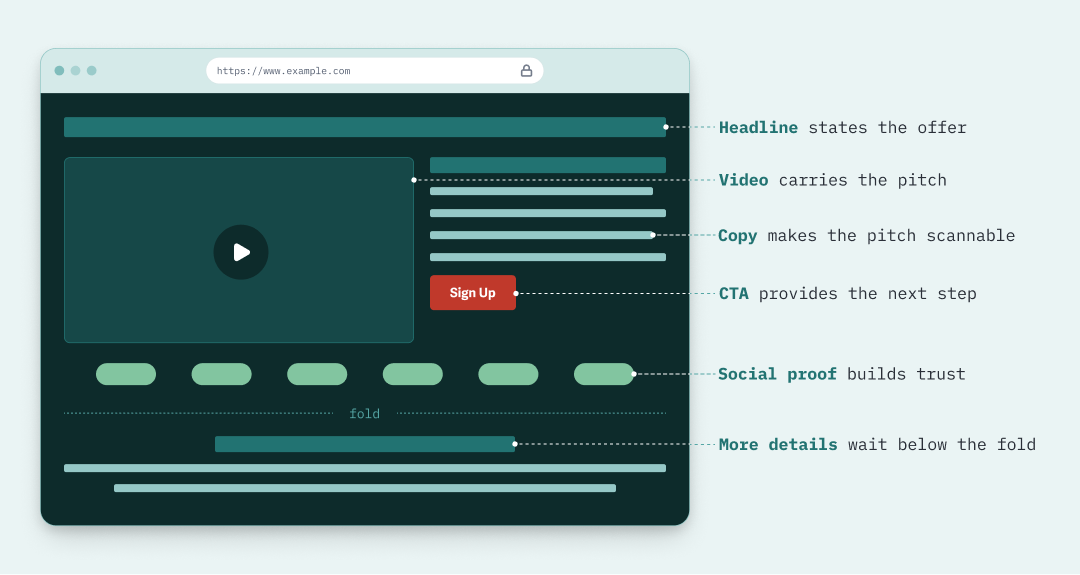
There are several ways landing pages successfully incorporate videos. But regardless of how video is used, a few elements nearly always remain the same.
1. Choose a Video Type
The right video type depends on what you want viewers to feel or do first.
- Fullscreen Background: Immerse viewers in your product or brand experience. These videos feature the product in the context of the lifestyle it is associated with.
- Founder Video: Introduce the people behind a company to build trust quickly. Pull back the curtain by letting people see who they’d be working with.
- Product Demo: Showcase the actual product or interface in action. Best for products where seeing it work answers more questions than describing it would.
- Customer Testimonial: Put your social proof front and center. When prospects are weighing multiple companies, let happy customers make the case for yours.
- Explainer Video: Deliver your elevator pitch in a short video. Name your ideal customer’s main pain point and show how your product or service solves it.
You’ll see each of these in action below, alongside real landing pages using them.
2. Consider Video Length
The ideal video length varies by industry, target audience, and video type; however, 71% of marketers agree that the most effective videos are 30 seconds to 2 minutes long. Dwight Zahringer, founder of digital agency Perfect Afternoon, trimmed a 4-minute video to 90 seconds, increasing conversions from 2.1% to 8.3%.
Product demos sent to prospects typically fall into the 2-5 minute range to provide all the details. But it’s common for homepage product demo videos to loop on mute. This allows visitors to see the product in action at a glance, without being asked to stop and watch.
Don’t force a cut just to hit a shorter runtime; give the video the time it needs to convey your product’s value.
Remember the Hook
Whatever video length you land on, pay special attention to your opening hook. Capturing attention in the first ten seconds is critical.
John Beaver, CEO and founder of standing desk company Desky, saw a 23% increase in clicks by leading with a unique selling point at the start of the video.
“Your video’s first 10 seconds need to work like a cold call opening.”
3. Place Video Above the Fold
Place the video at the top of the page so that viewers can play it without scrolling. A video buried further down won’t improve conversions if no one sees it.
Keep in mind that “above the fold” isn’t the same across screens. Make sure you test your video landing page on desktop and mobile.
4. Determine CTA Placement
Shorten the path from watching to converting by placing your call to action directly next to the video and above the fold across screens. Ensure that whatever action you want viewers to take, such as requesting a demo, reviewing pricing, or subscribing, is a clear, visible button that no one has to scroll or hunt for.
If your video hosting platform supports in-player calls to action, you can prompt viewers to act while they’re still watching. Test different trigger times to see what converts best for your offering.
5. Optimize the Thumbnail
Your thumbnail is the billboard for your video. It’s your greatest chance to influence a prospective customer to press play. You can intentionally use the visual elements of your thumbnail to increase views (as measured by play rate in analytics).
To create a high-converting thumbnail:
- Stay On-Brand: Align the visual story of your thumbnail with your brand tone and aesthetic. On-brand doesn’t always mean polished. Arvind Rongala, CEO of corporate training provider Edstellar, increased conversions by 27% by swapping a design-heavy image for a screenshot of the instructor at a whiteboard, better reflecting the courses.
- Hook with a Focal Point: The first moments after a visitor lands on your page are critical. Use the video thumbnail as a hook by making the pain point its focal point. Kerry Anderson, co-founder of SEO agency RankingCo, saw a 73% higher click-through rate when the thumbnail showed the problem.
- Use Color & Emotion: Contrast makes your thumbnail stand out from the rest. Use complementary colors, like yellow and purple, to create palettes that capture attention. Use color and other visual elements to conjure emotions that motivate viewers to act.
- Keep Text to a Minimum: Show, don’t tell, as much as possible. Use text to intentionally reinforce the video’s message or provide more context that increases the hook’s power. Avoid vague language and ensure the text is large enough to read across formats.
- Represent the Video Accurately: Above all else, the video thumbnail must align with the video’s content. If a viewer presses play expecting one video and gets a different topic or tone, they’re likely to bounce rather than convert.
The goal is to stop the scroll and capture enough attention to inspire action. If you have a high play rate, you know the thumbnail is working. If conversions still lag, you can rule it out and focus on other elements of the video and page.
6. Add Social Proof
Showcasing customer success with social proof helps remove doubt. Whether in the form of testimonial quotes, customer logos, review site badges, or user-generated content (UGC), social proof increases conversions. Kevin Heimlich, CEO of digital marketing agency The Ad Firm, increased demo requests from 1.5% to 4% by adding a 15-second testimonial after its product demo.
Social proof is a powerful trust-building tool on your page. Hugh Dixon, marketing manager for moving company PSS International Removals, noticed that placing social proof near the page’s video increased conversions even when visitors didn’t press play. Don’t be afraid to combine multiple types, such as logos, badges, and testimonials, on a single video landing page.
7. Remove Distractions
Make sure every element of your video landing page serves a specific purpose. Your video grabs attention and persuades. Social proof builds trust. Surrounding copy adds context at a glance. The CTA directs viewers to the next step you want them to take.
Any additional elements should similarly complete a specific job, or they become distractions and traffic-leak points. Nina Golban, SEO copywriter for solar installation company SunValue, quadrupled quote requests by adding a state-specific utility rates calculator below its video.
Meanwhile, removing unnecessary elements, like navigation, social links, and blog posts, helps focus the viewer’s attention. Bernadette King, CEO of the marketing agency King Digital Pros, consistently sees a 30-50% higher conversion rate on client landing pages when navigation is removed.
5 Video Landing Page Examples
1. Fullscreen Background Video
Fullscreen background videos, like this GoPro example, are common in e-commerce and typically occupy nearly all of the “above-the-fold” space on a landing page. They generally showcase the lifestyle associated with the product, inviting viewers to imagine themselves within it. As covered above, autoplay and looping on mute are standard for this format.
These video landing pages are also ideal for video portfolios, such as this example from video production company Lambda Films, which features past work.
2. Founder Video
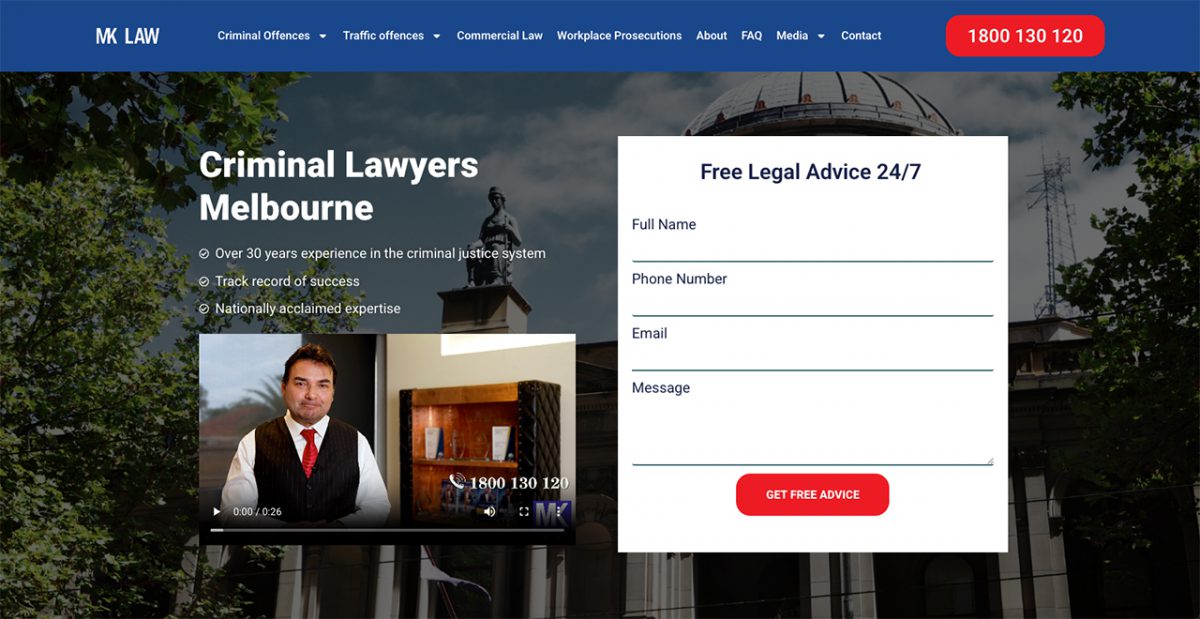
MK Law Firm uses a 30-second video to quickly connect with visitors by introducing the company founder. The brief surrounding text is written to build trust, while the prominent consultation form directs visitors to take the next step. If viewers scroll, they will discover more detailed information. But everything they need to know is visible as soon as they land on the page.
Landing Page Video Example
3. Product Demo
Product demos are the most straightforward video format because the company shows the product directly and how it is used. This Notion example autoplays on loop. The video itself is only 10 seconds long, which is all it needs to show businesses the platform’s value for managing projects across teams.
Above the fold, Notion focuses on driving action toward a demo request. But as soon as the visitor scrolls, they’re met with a wall of customer logos as social proof.
Landing Page Video Example
4. Customer Testimonial
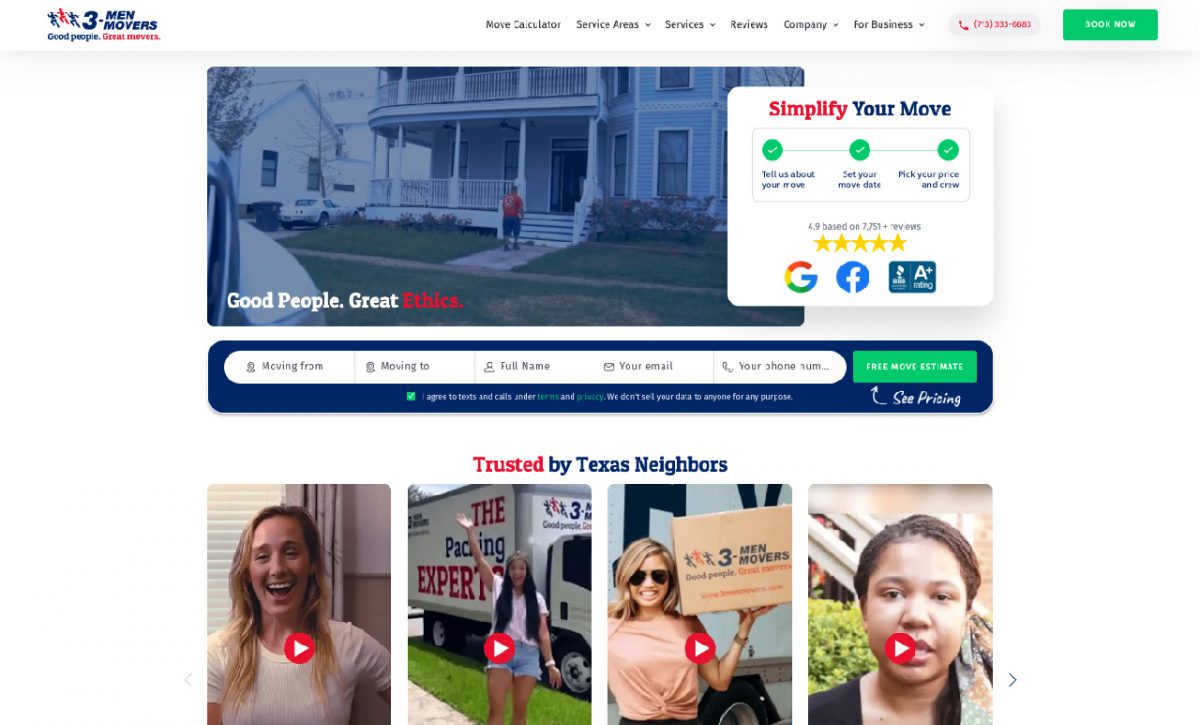
Customer testimonial videos are most commonly used as supporting elements rather than as the featured video. In this 3 Men Movers example, the page centers its “Free Move Estimate” call to action. But directly below sit four vertical testimonial videos that can be played without scrolling on most screens. Together, the page elements build trust in a company that handles something as personal as a move.
Landing Page Video Example
5. Explainer Video
Explainer videos amplify the viewer’s biggest pain point, then showcase the ‘after’ reality they can expect from the company’s service or product.
This SproutVideo example uses all of this article’s best practices above the fold: supporting text, CTA button, and social proof. Rather than relying on a thumbnail to earn a click, the video autoplays muted, with captions enabled, to grab the viewer’s attention.
Landing Page Video Example
How to Create a Video Landing Page with SproutVideo
Your landing page video can do a lot more than just play. With SproutVideo, your video becomes a brand-aligned asset that helps you better understand your audience.
No matter where you build your landing page, use SproutVideo to add your video for fast, reliable playback and a player that keeps your content protected.
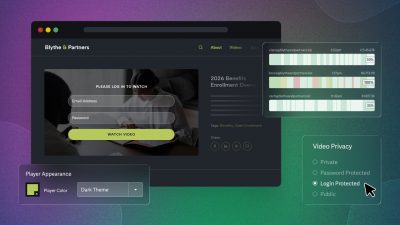
- Protect the Source Video: Set the video to Private (instead of Public). When embedded, the video is playable for everyone who visits your landing page. However, viewers will not be able to directly download the video or easily share it otherwise.
- Customize the Embed Code: Make your video a seamless part of the landing page. Customize colors and player controls, enable autoplay or looping, toggle on responsiveness so the video plays across screens, and more.
- Add the Embed Code to Your Landing Page: Paste the embed code wherever the video is intended to live within your website code or builder. Most website builders call this a “Custom HTML” block.
There’s a lot more you can do. Our guides to adding a video to your website and customizing your video player are great resources for seeing your options in action.
Next Steps: Optimize Your Landing Page Video
You can learn a lot about your landing page from the video’s engagement data and use that data to increase conversions.
- Play rate tells you how effectively you’re persuading viewers to watch. If this is low, start by testing different thumbnails to see if you can increase the rate. If your video autoplays, judge it by the retention graph and engagement data instead.
- The retention graph shows how well you keep their attention overall. If viewers drop off before your core message, the graph shows you where to tighten or cut the video.
- Engagement data provides insight into individual sessions: how much the person watched, where they dropped off or replayed, their location, device, and more. Gain a granular understanding of where your videos lose, confuse, or engage viewers.
- The HubSpot marketing automation integration connects viewer activity to your leads. When a visitor converts, their engagement appears in their HubSpot contact record, so you can use these insights to segment your audience and tailor your messaging.
With this information, you don’t have to guess whether your landing page video is working.
Try for Free
Ad-Free, Reliable & Private Video Hosting
Try video hosting built for business outcomes with our suite of analytics, marketing, and security tools, included with every plan.
- Generate a custom embed code & save your settings for next time.
- Showcase your brand front and center with our customizable video player.
- Protect your source video file, even when sharing videos publicly.
- Track success and optimize content with in-depth engagement metrics.
30 days free. No credit card required.
Video Landing Page FAQ
What is a video landing page?
A video landing page is a web page designed to persuade visitors to take a specific action, such as buying a product, signing up for a free trial, or requesting a demo. The video is playable above the fold, meaning the visitor doesn’t need to scroll to see it. Common elements that support the video on the landing page include copy, CTA buttons, and social proof.
Where should the video go on the page?
Place your video above the fold (visible without scrolling) on the landing page, taking up a prominent portion of the screen. This helps set it apart as the page’s focal point. Supporting elements should reinforce the video’s core messaging and build trust.
How long should the video be?
Your landing page video should be 30 seconds to 2 minutes long in most cases. Autoplaying looping videos are often much shorter, operating like a GIF that plays for about 10 seconds on repeat.
Conversely, some products benefit from longer runtimes (2-5 minutes), such as when asking visitors to request a demo after first learning about the product. Ultimately, your video should be the length it needs to be to convey the core value of your service or product to new prospects.
Should the video autoplay?
Whether the video should autoplay depends on your product, goals, and audience. Requiring viewers to press play gives you additional data for optimizing conversions. If your landing page video has a low play rate, you can start testing elements such as the thumbnail to determine what needs improvement.
But in some cases, a few seconds of silent video can convey more. E-commerce companies, for example, may autoplay short, looping videos of someone using the product to inform visitors without interrupting the shopping experience.
If you autoplay a video with a spoken message, mute it and turn on captions.
Try SproutVideo Free for 30 Days
Test every feature with your own videos before you commit, no credit card required.
— HJ Matthews, Business Development Manager, Brain Jar