
Video password protection limits access to anyone with the password. When sharing a video with one person or a small, trusted group, passwords are easy, quick, and suitably private.
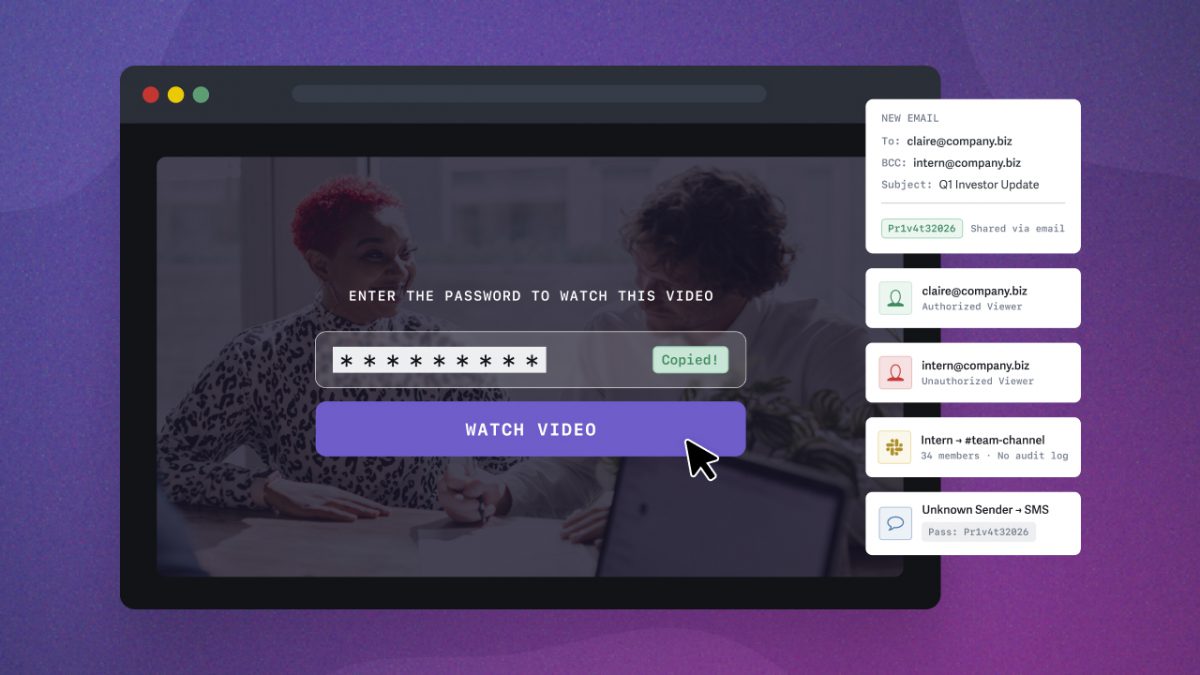
Businesses often use password protection the same way: set a password, share a link — done. But that simplicity can be the video’s greatest vulnerability. The moment that password leaves your hands, any viewer can share it. Worse, there’s no way to tell if you’ve lost control.
When the stakes are low, password protection is the right tool. When you need only specific people to watch your video, use identity-based access controls, such as login protection or single sign-on (SSO), to assign individual credentials.
In many cases, password protection is ideal. But when it’s not, the potential effects on reputation and revenue are real. Use the flowchart below to determine which option best fits your situation.
Table of Contents
- What Is Password Protection for Videos?
- When Password Protection Is Enough
- Why Password Protection Falls Short
- Access Controls Beyond Password Protection
- Which Video Security Level Do You Need? (Flowchart)
- When Controlling Who Watches Isn’t Enough
- Find Your Secure Video Sharing Workflow
- FAQ on Video Password Protection
What Is Password Protection for Videos?
Video password protection restricts playback behind a password gate. Anyone attempting to watch the video must enter the correct password before it plays.
You can share password-protected videos via protected links or secure embed codes. This flexibility allows you to password-protect videos that exist on public website pages. Alternatively, you can share a protected link that displays the video on its own landing page.
Video password protection is the easiest way to share video with access controls, and most video hosting platforms support it on all plan tiers. It’s often preferred for private video sharing because no setup is required beyond setting the password, making it easy to share and watch.
How to Password Protect a Video
The exact steps to adding password protection to a video vary by platform, but the general workflow is the same:
- Upload your video to your hosting platform
- Navigate to the video’s privacy or sharing settings
- Enable password protection and set a password
- Share the video link and password with your intended viewers, ideally through separate channels
In SproutVideo, password protection is available on all plans. You can set a unique password for each video in your library.
When Password Protection Is Enough
Video passwords let teams move quickly. But before sharing, consider the risks of unauthorized distribution of content. Video password protection is recommended when you need to:
- Share video with an individual or a small, trusted group
- Gate video content, but aren’t concerned about misuse
- Tracking specifically who watched a video isn’t needed
Common use cases include webinar replays, marketing assets, client deliverables, peer-to-peer video sharing, and non-sensitive internal communications.
When your content meets the conditions above, password protection is the ideal tool for the job, balancing private and frictionless video sharing.
For example, a media agency shares in-progress work directly with the individual client using a password-protected video link. With only one person having the password, any view event is effectively attributable to them. The agency can review whether and when the client watches the video and spot misuse, since no one else has the credentials.
Note: Sharing videos by embed code protects them from direct download (unless explicitly allowed). Learn more about protecting videos from download and piracy.
Why Password Protection Falls Short
The security of a password-protected video relies on a shared credential, rather than identity-based authentication. In practice, this means:
- Easily forwarded: Anyone with the link and password can share it without your knowledge. The ease with which you shared the video is also its greatest vulnerability.
- No audit trail: You can’t track who watched, identify misuse, or hold anyone accountable for unauthorized sharing.
- Can’t revoke access: Without identity authentication, you can’t revoke access from specific individuals. You have to replace the video and reshare a new password.
- Doesn’t scale: The more people who need access, the less secure the password becomes. As the audience grows, you lose insight and control over who is watching.
When videos have a real job to do inside a business, these limitations become genuine risks to reputation and revenue.
Many businesses default to password protection because it’s the most familiar option, but it’s not the only one. Learn about identity-based access controls next.
Access Controls Beyond Password Protection
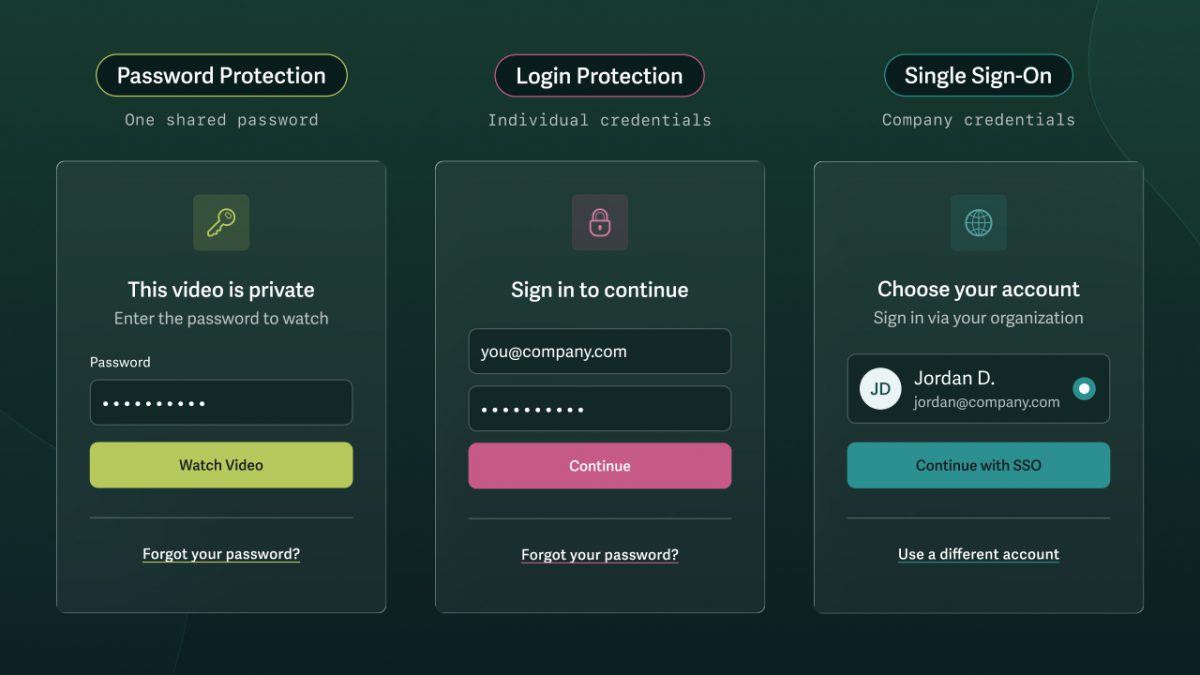
When a shared password isn’t sufficient, identity-based access gives you control with viewer-level tracking and the ability to revoke access individually — all without adding friction for your viewers. Here’s what each looks like from the viewer’s perspective.
What Is Login Protection for Video?
Login protection is an identity-based video access control that lets you assign an email address and password to specific viewers. Only viewers with credentials can access the content, and individual tracking makes it easy to spot misuse and assign responsibility. It allows you to:
- Decide which videos a viewer can access
- Set how long access lasts
- Limit the number of login sessions per viewer
- Revoke individual access at any time
- Control what content each viewer sees
Identity-verified access provides a level of control that’s ideal for monetized content, sensitive internal communications, pre-release demos, sales enablement, onboarding and training, and any other workflow where unintended video distribution holds real business consequences.
For example, multiple departments are collaborating on an upcoming launch. With login protection, the business assigns each person individual credentials. Management can ensure that all necessary parties have viewed the content and identified any unusual patterns before a leak becomes a public problem.
What Is Single Sign-On (SSO) for Video?
Single sign-on (SSO) allows employees to authenticate with a single login across all company tools. It’s the strongest form of video access control for organizations that already manage employee credentials via an Identity Provider such as Okta, Google Workspace, or Microsoft Azure AD. For teams that want individual-level video access without the need or resources to manage SSO, login protection provides the same identity-based access control.
Which Video Security Level Do You Need? (Flowchart)
Determine whether password protection is sufficient for your content and when login protection or single sign-on (SSO) is more appropriate. Follow the path that matches your situation.
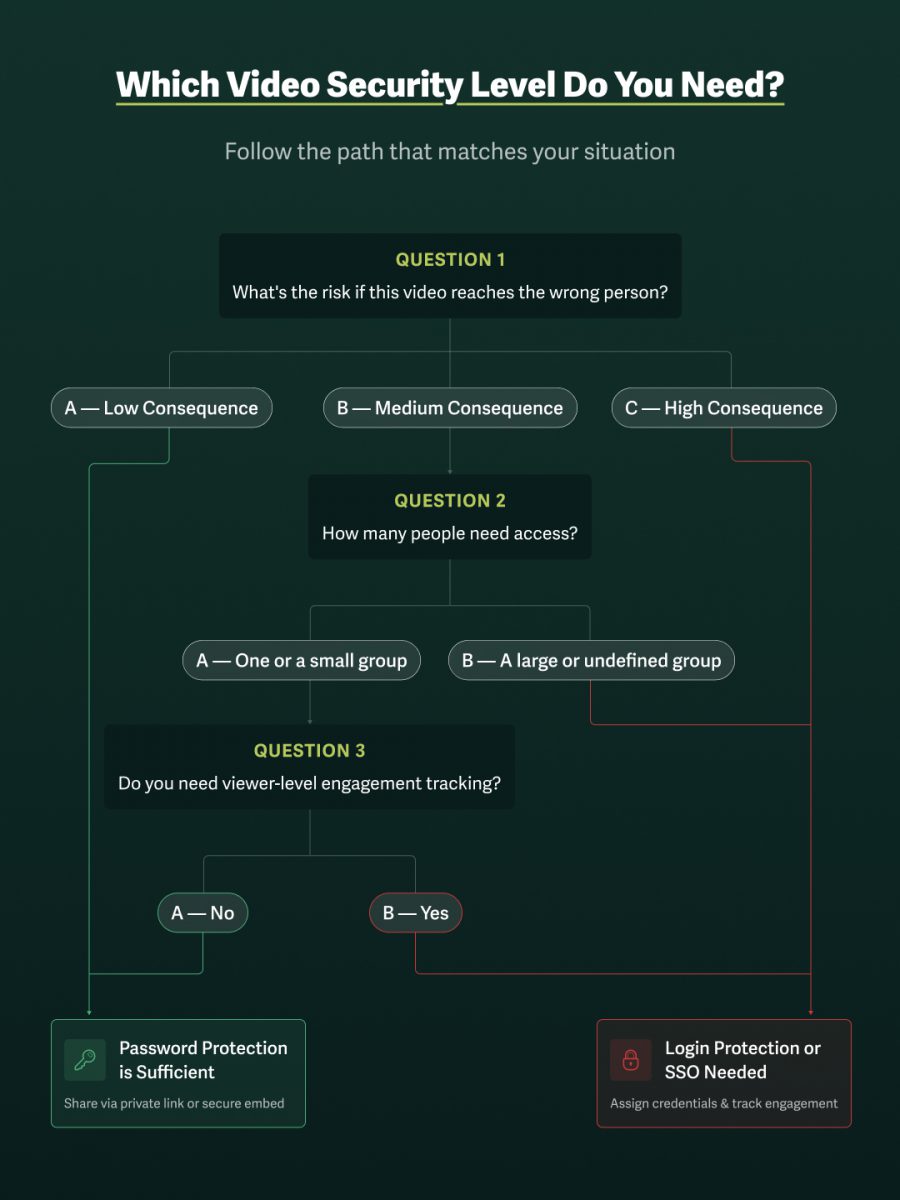
Question 1: What’s the risk if this video reaches the wrong person?
Low consequence
Unauthorized access carries no material risk to the business, i.e., marketing asset or deliverable shared with a trusted contact.
Password protection is sufficient. Share via private link or secure embed.
Medium consequence
Unauthorized access can cause reputational damage, strained relationships, or competitive exposure, e.g., unreleased product demos or internal communications.
In this scenario, continue to Question 2.
High consequence
Unauthorized access can pose legal, financial, or revenue risks to the business, including in regulated industries, for monetized or proprietary video, or for confidential communications.
Login protection or SSO is needed. Assign credentials and track viewer-level engagement.
Question 2: How many people need access?
- One or a small group: Continue to Question 3.
- A large or undefined group: Login protection or SSO is needed. Assign credentials and track viewer-level engagement.
Question 3: Do you need viewer-level engagement tracking?
- No: Password protection is sufficient. Share via private link or secure embed.
- Yes: Login protection or SSO is needed. Assign credentials and track viewer-level engagement.
Note: Password protection and viewer tracking aren’t always mutually exclusive. If you’re sharing a password-protected video via email, SproutVideo allows you to associate a specific email address with a view event without requiring your viewer to log in.
When Controlling Who Watches Isn’t Enough
When you can’t afford for video content to leak, layering secure video controls is essential. The first layer controls access to video, either through password protection, login protection, or single sign-on.
But access controls determine who gets to watch — not what happens once someone presses play. To maintain control, add additional secure video measures (such as IP or Geo restrictions, allowed domains, signed embed codes, or dynamic watermarks) when the following scenarios apply:
Restrict Playback by Location with Geographic or IP Address Restriction
Prevent viewers from watching content outside of specific IP address ranges or countries as an additional way to control who can access what content and where.
Add this layer to your workflow when you need to:
- Restrict viewing to physical locations, e.g., the office or warehouse.
- Block access where your audience doesn’t reside, reducing exposure to bad actors
- Prevent video sharing across locations or from unexpected regions
Lock Playback to Specific Environments with Allowed Domains or Signed Embed Codes
When sharing a video on a webpage or within an application, prevent it from loading or playing outside allowed domains or require tokenized access via signed embed codes.
Add this layer to your workflow when you need to:
- Ensure the video cannot be lifted and redistributed
- Prevent video from playing outside of specific environments
Create an Audit Trail with Viewer Tracking & Access Logs
When using login protection, you automatically create an audit trail that tracks every viewing session and ties it back to a specific user.
Add this layer to your workflow when you need to:
- Prove viewing completion for compliance, training, or onboarding
- Collect data to ensure accountability and minimize damage in the event of a leak
- Spot viewing patterns that may indicate credential sharing or unauthorized access
- Gain insight into viewing behavior to improve content and increase retention
Deter Theft and Trace Leaks with Dynamic Watermarking
Visible dynamic watermarks allow businesses to deter theft by displaying the viewer’s personal information (email address, IP address, etc) on-screen, with a semi-transparent watermark that moves intermittently across the screen. Invisible dynamic watermarks trace who is responsible should the deterrent fail.
Add this layer to your workflow when you need to:
- Share pre-release or confidential content where screen recording is a threat
- Deter leaks by making the consequences of sharing visible to the viewer
- Hold viewers accountable by tracing leaks back to specific credentials
- Protect monetized content from intellectual property theft
Build a Secure Video-Sharing Workflow: How to Secure & Protect Videos
Find Your Secure Video Sharing Workflow
Consider these common use cases to determine the stack of secure video-sharing features that best protect your video assets.
Media Agencies & Client Deliverables
Agencies need a fast way to restrict access and track engagement while sharing work with clients. Video password protection via a protected link keeps the content private while making access as simple as knowing the password.
Since the audience is typically one person or a specific company, any view event is attributable by default. While the agency doesn’t know exactly who watched the video, it can determine if the client viewed the content and where they replayed or dropped off. In this scenario, password protection provides the necessary level of protection without overcomplicating the workflow.
✅ Secure Workflow: Password protection + protected link
Learning & Development or Communications Teams
When sharing training, onboarding, compliance content, or other internal communications, individual viewing tracking becomes a necessity.
With individually assigned credentials that assign every viewing session to a specific viewer, businesses can easily confirm who has completed the required viewing. Viewer tracking also provides an audit trail for compliance and HR. Finally, signed embed codes prevent videos from playing outside the LMS, intranet, or internal portal where they belong.
✅ Secure Workflow: Login protection + allowed domains or signed embed codes + viewer tracking
Online Course Creators & Solopreneurs
Course creators selling access to video content need to protect their intellectual property without disrupting the student experience. Login protection ensures only paying students can access content with individual credentials. It also makes it easy to revoke access if a member misuses content or cancels their subscription.
Allowed domains lock video playback to the course platform, preventing the embed from being lifted and hosted elsewhere. Dynamic watermarking adds a final layer of deterrence against screen recording and makes unwanted copies traceable to the source, providing creators with evidence to pursue takedowns and protect their work.
✅ Secure Workflow: Login protection + allowed domains + dynamic watermarking
Enterprise Teams & Regulated Industries
Enterprises and teams within regulated industries face serious consequences to reputation, revenue, and liability, even from a single point of failure. In these situations, single sign-on (SSO) provides the strongest identity authentication. Employees use the same credentials across tools, and access is automatically revoked when they leave the organization.
Geographic and IP restrictions allow businesses to limit access to specific locations, ensuring viewers can watch videos only from approved offices, warehouses, or franchises. Signed embed codes lock video in the internal portals and applications, preventing content from playing outside permitted environments. Dynamic watermarking deters screen recordings and, importantly, makes leaks traceable to a specific viewer. Finally, viewer tracking with access logs creates the audit trail required for large organizations and teams in regulated industries.
✅ Secure Workflow: Single Sign-On (SSO) or login protection + geo or IP restrictions + allowed domains or signed embed codes + viewer tracking + dynamic watermarking
FAQ on Video Password Protection
Can you password-protect a video?
Yes, you can password-protect a video using a private video hosting platform. Most platforms make it easy to share password-protected videos with a link. Depending on the platform, you can also embed password-protected videos on your website.
How can I protect my video from being copied?
Protecting video from being copied requires multiple layers of defense: controlling who can access the content and what happens once someone presses play. Access controls — password protection, login protection, or SSO — ensure only intended viewers can watch.
But access alone doesn’t prevent an authorized viewer from screen recording, downloading, or redistributing content. That’s where content protections like dynamic watermarking, download prevention, and viewer tracking come in. Together, these layers make unauthorized copying harder to execute, easier to detect, and traceable to a specific source. A private video hosting platform purpose-built for security gives you all of these tools in one place.
Does YouTube allow password-protected videos?
YouTube does not allow password-protected videos. Private YouTube videos are shared only via email address. However, YouTube does not protect videos from being copied once viewers have access. YouTube provides minimal access controls and no protection from piracy. A private video hosting platform lets you password-protect videos and keep them secure.
How do I keep my videos private?
On platforms like YouTube and Vimeo, videos are public unless you manually change the settings — and even “private” or “unlisted” videos offer minimal control once the link is shared. A private video hosting platform like SproutVideo sets every video to private by default, meaning the source file is protected from viewers and search engines the moment it’s uploaded.
From there, you control exactly who can watch using access controls such as password protection, login protection, or SSO. Additional layers, such as domain restrictions, viewer tracking, and dynamic watermarking, keep content secure and private even after it’s been shared with the intended audience.
How do I stop people from downloading my videos?
Stop people from downloading your videos by sharing content with a private video hosting platform via a protected link or embed code on your website or portal. These sharing methods prevent direct downloads, unless manually enabled.
Protecting content from video piracy requires a multilayered approach; learn more in this comprehensive guide to preventing downloads and piracy.
What is the difference between password protection and login protection for video?
The difference between password protection and login protection is:
- Password protection secures a video behind a shared credential: anyone with the link and password can watch. It’s ideal for low-stakes sharing with a small, trusted group.
- Login protection assigns individual credentials to specific viewers, creating an audit trail that ties every viewing session to a specific person. Login protection is appropriate when you need to control, track, or revoke access at the individual level.
Can a password-protected video be shared without my permission?
Yes, anyone with the link and password can forward both to other people without your knowledge. Password protection secures a video behind a shared credential, not an identity — so there’s no authentication step to flag an unfamiliar viewer and no audit trail to track unauthorized sharing.
If that risk is unacceptable for your content, login protection or single sign-on (SSO) is the necessary access control. Both options assign individual credentials to specific viewers, so every viewing session is tied to a specific person, making unauthorized sharing detectable, traceable, and revocable.
What is the most secure way to share a private video?
The most secure way to share a private video combines identity-based access control with layered content protections and viewer-level tracking.
Start with access control: single sign-on (SSO) is the strongest option for organizations managing employee credentials, while login protection offers the same individual-level of control for teams that don’t need or have SSO infrastructure. Both assign unique credentials to specific viewers, create an audit trail, and allow you to revoke access instantly.
From there, layer content protections based on your risk level. Allowed domains or signed embed codes prevent the video from playing outside permitted environments. Geographic and IP restrictions limit viewing to approved locations. Dynamic watermarking deters screen recording and makes any leak traceable to the specific viewer responsible.
For most business use cases, the right combination is login protection or SSO plus at least one content protection layer. Add further layers based on how a leak could affect your business’s reputation, revenue, or legal standing.
See our Complete Guide to Private and Secure Video Sharing for more.